Box Model
In this lesson, we'll look at how much space elements take up on a page and what separates them from each other. The key idea is simple: every element on a page is a rectangular box, even when you can't see its edges.
For example, when you give a heading a background color, the whole row of the page gets colored, not just the area behind the text. That's because the background fills the element's whole box, and most elements, such as headings, paragraphs and divs, are as wide as the element they are in (their parent) by default. Some elements, such as strong or a, are only as wide as their content. We'll see why in the lesson Display and Position.
Each element's box has four parts, from the inside out:
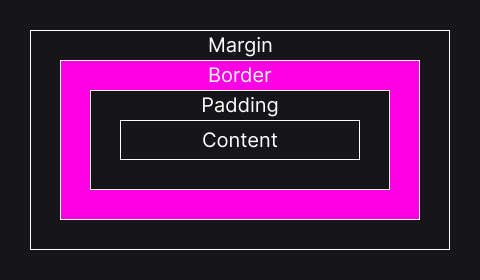
- Content: the content of the element itself, such as the text of a paragraph or an image.
- Padding: the space between the content and the border.
- Border: a line around the content and the padding. It can also be invisible.
- Margin: the space outside the border, which separates the element from the elements around it.
Imagine a framed picture on a wall: the content is the picture itself, the padding is the mat (the strip of card between the picture and the frame), the border is the frame, and the margin is the gap between this frame and the next picture on the wall.
In this lesson, we'll learn to set each of these parts with CSS. The cat page already has a short style.css with the colors and fonts you know from the previous lessons. To make the boxes visible, we'll give every element a red border for now. You'll see that the boxes of the headings span the whole width even though their text is short, while the box of the strong element is only as wide as its text.
Tip: You can look at the box of any element on any website (including the preview here) right in your browser. Right-click the element and choose Inspect. The developer tools open, and when you hover over an element in them, the browser highlights its content, padding, border and margin on the page in different colors.