Summary
In this lesson, we learned that:
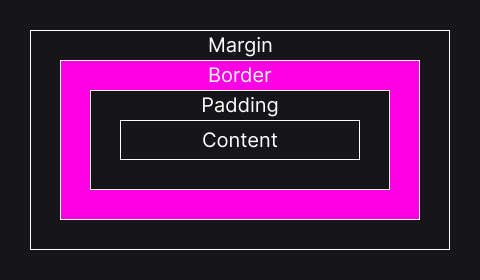
- Every element on a page is a box with four parts: the content, the padding, the border and the margin. Like a picture on a wall with its mat, its frame and the gap to the next picture.
- Headings, paragraphs and
divs are as wide as their parent by default. - In a browser, right-click any element and choose Inspect to see its box.
- By default,
widthandheightset the size of the content. - Sizes can be given in pixels (
px, fixed), percent (%, a share of the parent),vwandvh(1% of the width or height of the browser window) orrem(the base font size). - A border is written as
border: width style color, for exampleborder: 2px solid #476958. The order doesn't matter, but without a style (solid,dashed,dottedand so on) there's no border.border-top,border-bottomand the like set one side only. border-radiusrounds the corners, andborder-radius: 50%turns a square into a circle.paddingis the space between the content and the border, and the element's background fills it.box-sizing: border-boxmakeswidthandheightinclude the padding and the border. Many stylesheets start with* { box-sizing: border-box; }.marginis the transparent space outside the border. Browsers give some elements a default margin, for example 8 pixels aroundbody.paddingandmargintake one to four values:padding: 10px(all sides),padding: 10px 20px(top and bottom, left and right),margin: 0 0 10px 0(clockwise from the top).- The vertical margins of neighboring elements collapse: the gap is as big as the larger one.
margin: 0 autocenters an element that has a width.overflowsets what happens to content that doesn't fit:visible(the default),hidden,scrollorauto(scrolling only when needed).
Our cat page now has cards with borders, rounded corners and spacing in a centered section. Next comes another small project: a profile card, on which you'll use fonts and the box model on your own. Then, in the lesson Display and Position, we'll find out why some elements are as wide as the page while others are only as wide as their content, and how to place elements exactly where we want them.