Rules and Comments
Welcome to the second CSS lesson! In the previous lesson, you wrote your first rule. Let’s look at its parts and their names more closely, because we’ll use them all the time:
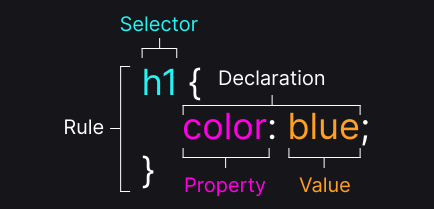
- A rule is the whole thing: a selector and declarations in curly braces.
- The selector selects the elements that the rule styles. The selector
h1selects allh1elements. - A declaration says what to change and how. It consists of a property and a value, separated by a colon, and it ends with a semicolon.
- The property is what we change, for example the color of the text (
color). - The value is what we change the property to, for example
blue.
A stylesheet is simply a list of rules. Spaces and line breaks don’t matter to the browser, so h1{color:blue} would work too. But rules written on several lines, with the declarations indented, are much easier to read.
A stylesheet can also contain comments: notes for people that the browser ignores. A comment starts with /* and ends with */, and it can span several lines:
/* Main heading */
h1 {
	color: blue;
}

/*
p {
	color: green;
}
*/
Comments are used to explain the code, and also to turn a part of it off for a while: the rule for p above is inside a comment, so it does nothing. Watch out: the HTML comment <!-- --> doesn’t work in CSS. Here, only /* */ works.
In style.css, we’ve left the rule from the previous lesson, and we’ve removed the inline style from the main heading so that it doesn’t get in the way.