
Absolute Position
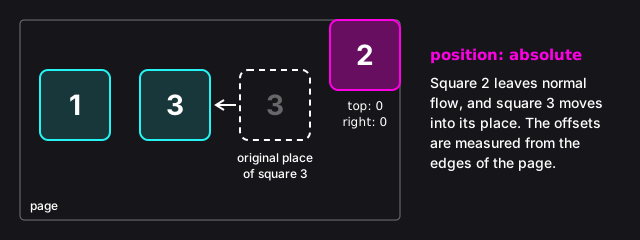
An element with position: absolute is taken out of normal flow: the other elements behave as if it weren't on the page at all, and they fill the space it left behind.
Its offsets work differently, too. They aren't measured from the element's original place, but from the edges of its nearest ancestor (its parent, the parent's parent, and so on) whose position is anything other than static. If there's no such ancestor, they're measured from the edges of the page (more precisely, of its first screen, as you'll see later in this lesson). For example:
.note {
	position: absolute;
	top: 0;
	right: 0;
}
If none of the ancestors of the element with the class note has a position other than static, this element sits in the top right corner of the page.
Instructions
Start programming for free
6/10