
Attributes
In the previous lesson, we learned how to create the text content of a web page. In this lesson, we will look at more advanced elements. Before we can use them, though, we need to learn another HTML concept: attributes.
Attributes give an HTML element extra information. We write them in the opening tag of the element, like this:
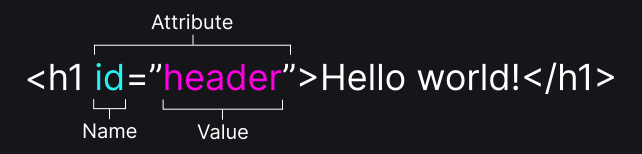
In the image, you can see an attribute named id with the value title. First comes the name, then an equals sign and then the value in quotes. We always write the value in quotes: we will use double quotes, but single quotes work too.
The id attribute has several uses. For now, it is enough to know that it gives an element a name by which we can find it. That is why every id must be unique: no two elements on the same page can have the same id.
There is also an attribute that every page should have, although we haven't met it yet: lang on the html element. It tells browsers, search engines and screen readers which language the page is written in:
<html lang="en">In our exercises, it is in the hidden part of the page, together with the document declaration and the head element.
Instructions
Start programming for free
1/12